This guide covers the exact sequence to follow, the variables that determine how smooth the transition goes, and the mistakes that cause disruptions — so you can make the change without dropping anything.
Key Takeaways
- File USPS mail forwarding and IRS Form 8822-B before or simultaneously with your physical move — not after
- IRS updates take 4–6 weeks to process
- USPS mail forwarding activates within 3 business days (allow up to 2 weeks for full effect)
- Each agency requires a separate filing — the Secretary of State update does not cascade to the IRS, state tax agencies, or your bank
- A PO Box is rejected by many agencies as a registered address; a private mailbox with a real street address is widely accepted
- A permanent commercial mailing address means you never have to repeat this process when your physical location changes
Why Business Address Changes Cause Service Interruptions
Most disruptions happen because the steps get done in the wrong order. The physical move happens first, agency notifications come second, and the gap between them is where things go wrong.
Three consequences show up consistently:
- Missed legal notices — IRS Form 8822-B explicitly warns that failure to update a business mailing address may prevent receipt of a notice of deficiency or demand for tax
- Lost shipments — vendor deliveries and customer returns sent to the old address with no forwarding in place simply disappear
- Customer confusion — conflicting address information across your website, Google listing, and directories creates doubt about whether the business is still operating
Timing gaps make this worse. USPS forwarding may activate within 3 business days but can take up to 2 weeks. IRS updates take 4–6 weeks. State agency timelines vary. Getting ahead of those windows — before the move date, not after — is what separates a smooth transition from a weeks-long scramble.
How to Change Your Business Address: The Right Sequence
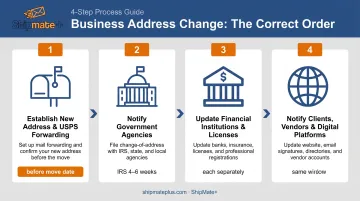
Step 1: Establish Your New Address and Set Up Mail Forwarding First
Before notifying any agency, confirm that your new address can actually receive what you need it to receive.
A standard USPS PO Box only accepts USPS mail — private carriers like UPS and FedEx can't deliver to it. For businesses receiving packages from multiple carriers, that's a real gap.
A private mailbox at a Commercial Mail Receiving Agency (CMRA), like the mailbox rental service at ShipMate+ in Vista, CA, provides a real street address that accepts deliveries from USPS, UPS, FedEx, DHL, and couriers.
Once your new address is confirmed, file a USPS Change of Address (PS Form 3575) to begin mail forwarding from your old address. Standard forwarding lasts 12 months and acts as a safety net while all other updates are in progress. For an in-person business filing, you'll need documentation showing you're an authorized agent — a notarized letter or company-letterhead authorization works.
Important USPS formatting rule: If your new address is a CMRA, all mail must use PMB or # followed by your private mailbox number. Mail missing this designation can be returned as undeliverable.
Step 2: Notify Government Agencies
Handle each agency separately — none of them automatically updates the others.
IRS Form 8822-B File Form 8822-B, Change of Address or Responsible Party by mail to update your business address with the IRS. Allow 4–6 weeks for processing. If your responsible party has also changed, that update must be reported within 60 days of the change. The IRS does not publish a fax option for this form — mail is the required method.
Secretary of State File the appropriate amendment with your state's SOS office. Requirements vary by state:
- Colorado: Statement of Change
- Washington: Amended Annual Report
- California: Statement of Information (Form LLC-12 for LLCs, Form SI-550 for corporations)
In California, mid-period amendments filed solely to report an address change carry no additional fee. Standard online processing runs 1–2 business days; expedited options are available (24-hour for $350, same-day for $750) if timing is tight.
State Tax Agency This is a separate filing from the SOS update. In California:
- Update the Franchise Tax Board via MyFTB online or by mailing Form 3533-B
- Update CDTFA through their online portal under Names and Addresses — note that CDTFA treats a location change as closing the old location and adding a new one, not a simple address edit
Step 3: Update Financial Institutions and Business Licenses
Neither of these updates happens automatically — you have to initiate each one:
- Banks and lenders: Contact each institution to update your address. Billing, loan correspondence, and tax documents tied to old records create compliance gaps that aren't visible until something goes wrong.
- Business licenses: Each license requires a separate update with its issuing agency. Pull a complete list of every license your business holds and work through them individually — state and federal registration changes don't carry over.
Step 4: Notify Clients, Vendors, and the Public
Send proactive email communication to clients and vendors before the move date with a clear effective date. Follow up with confirmation once the change is complete.
Then update every digital touchpoint:
- Website contact page and footer
- Google Business Profile
- Yelp for Business and Apple Business Connect
- All social media profiles
- Industry-specific directories where your business is listed
Don't treat this as optional. According to BrightLocal's 2023 research, 62% of consumers would avoid a business after seeing incorrect information online, and incorrect addresses specifically caused 46% to lose trust in a business. Inconsistent NAP (Name, Address, Phone) data across directories also damages local search rankings, per Moz's local SEO guidance.
What to Have Ready Before You File Anything
Starting the filing process unprepared is how registrations lapse and mail goes missing. Gather these before you begin:
- Current business registration documents and your EIN
- A complete list of every license your business holds (state, local, federal, industry-specific)
- A list of every vendor, bank, and agency that has your address on file
- Confirmation that your new address type is accepted by each relevant agency
On that last point: California requires a physical street address for an individual agent for service of process — a PO Box is not acceptable. Google also rejects PO Boxes and remote mailboxes for Business Profile representation. Verify your chosen address format against each agency's specific requirements before you lock in your new address.
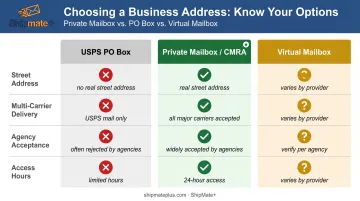
Then build a timeline working backwards from your move date. Account for:
| Agency | Typical Processing Time |
|---|---|
| USPS forwarding | 3 business days (allow up to 2 weeks) |
| IRS Form 8822-B | 4–6 weeks |
| California SOS (online) | 1–2 business days (expedited options available) |
| FTB / CDTFA | Varies; allow 1–2 weeks |
Common Mistakes That Cause Business Disruptions
Most address-change disruptions trace back to a handful of predictable errors. Avoid these three:
- File before you move. Submitting USPS forwarding and agency notifications after the physical move leaves a gap where legal notices, invoices, and compliance documents arrive at the old address with nowhere to go. This is the most common — and most costly — mistake.
- Each agency requires a separate update. Updating the Secretary of State does not update the IRS, state tax agencies, banks, or individual licenses. Missing even one creates a compliance gap that may not surface until a notice goes to the wrong address months later.
- Update all digital platforms in the same window. Changing your website while leaving Google Business Profile, Yelp, or Apple Maps unchanged creates conflicting information that hurts both customer trust and local search visibility.
Your Long-Term Address Strategy
For home-based businesses, solo operators, and small teams, the most common reason for repeated address changes is outgrowing or leaving a residential address. Every move restarts the entire notification sequence.
A permanent commercial mailing address solves this by giving your business a stable address that doesn't change when you do.
ShipMate+ in Vista, CA offers private mailbox rentals with a real street address — not a PO Box — that accepts deliveries from USPS, UPS, FedEx, DHL, and couriers. The mailbox includes free package receiving and signing, email and text notifications when mail arrives, and 24-hour secured lobby access independent of store hours. For businesses in Vista and surrounding North San Diego County areas, it provides a professional commercial address without the cost of a full office lease.
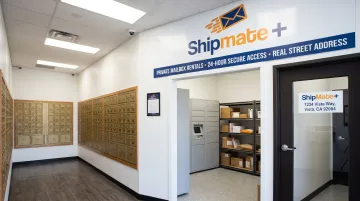
How it compares to other options:
| Option | Street Address | Multi-Carrier | 24-Hour Access | Agency Acceptance |
|---|---|---|---|---|
| USPS PO Box | No | USPS only | Post office hours | Often rejected |
| Private mailbox (CMRA) | Yes | Yes | Yes (at ShipMate+) | Widely accepted |
| Virtual mailbox | Varies | Varies | App-based only | Verify per agency |
One important note: for California businesses, confirm with your registered agent service whether your mailbox address qualifies for the specific agency filings you need. ShipMate+ also offers registered agent services, which can streamline compliance: they receive and forward legal documents and send reminders for upcoming filing deadlines.
Conclusion
Changing a business address without interruptions is a sequencing problem. Establish the new address and activate mail forwarding first. Notify government agencies next — IRS, Secretary of State, and state tax agencies separately. Update financial institutions and licenses individually. Then communicate the change to clients, vendors, and every digital platform where your address appears.
The failures almost always come from reversing this order or assuming a single filing carries over to other agencies. Treat each institution as its own action item and build processing lead times into your schedule. Most delays aren't caused by complexity — they're caused by starting too late or skipping a step that seemed minor.
Frequently Asked Questions
How do you change your mailing address for your business?
File USPS PS Form 3575 to begin mail forwarding, submit IRS Form 8822-B by mail to update federal records, file the appropriate amendment with your state's Secretary of State, and notify your bank and each licensing agency separately. Each is a distinct action — none automatically triggers the others.
Can I use a mailbox address for my business?
A private mailbox with a real street address at a CMRA is accepted by most state agencies and the IRS as a business mailing address and can receive packages from all major carriers. It's a practical option for home-based businesses that need a professional commercial address without leasing office space — just confirm acceptance with any specific agency before filing.
Does changing a business address require a new EIN?
No. Your EIN is tied to your business entity, not its location. A new EIN is only needed when the business structure or ownership changes — for example, if a sole proprietor incorporates or if a merger creates a new legal entity.
How long does it take for a business address change to become official?
It varies by agency. USPS forwarding typically activates within 3 business days (allow up to 2 weeks). California SOS online filings currently process in 1–2 business days. IRS Form 8822-B takes 4–6 weeks.
Do I need to notify customers when I change my business address?
There's no legal requirement to notify customers directly, but failing to do so leads to misdirected payments, lost business, and confusion. Emailing customers before the move date and updating your contact information online covers most businesses well.
What is the difference between a mailing address and a registered business address?
A registered business address is the legal address on file with the state for official government and legal correspondence. A mailing address is where day-to-day mail is received. They can be the same or different, but most state and federal agencies require a physical street address — not a PO Box — for registration purposes.