Introduction
Vista residents and small business owners face a common challenge: managing mail reliably without missed deliveries, privacy concerns, or repeated trips to the post office. With nearly 300,000 nonemployer establishments across San Diego County — freelancers, sole proprietors, and home-based entrepreneurs — the demand for professional mail solutions continues to grow.
Two popular options exist: virtual mailboxes that digitize your mail for remote access, and physical mailbox rentals that give you a real street address at a local store. The choice affects your address legitimacy, package handling, access convenience, and monthly costs — each in ways that matter differently depending on how you run your business. This guide compares both options side by side so Vista residents can choose with confidence.
Key Takeaways
- Virtual mailboxes digitize mail for remote access but have package size limits and may not qualify as a legal business address
- Physical mailbox rentals provide a real Vista street address, 24/7 lobby access, and package handling from all carriers
- Virtual mailboxes suit digital nomads and remote workers with mostly document-based mail
- Physical mailbox rentals work best for Vista home-based businesses that need a credible local address and full package support
- Vista's growing small business economy makes a credible, professional address increasingly important for local businesses
Virtual Mailbox vs Physical Mailbox: Quick Comparison
Cost
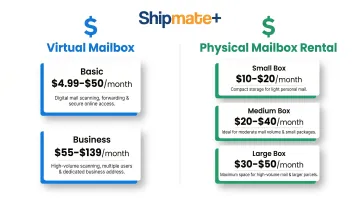
Virtual mailbox services typically range from $5–$50/month depending on scan volume and features. Basic plans from providers like Anytime Mailbox start at $4.99/month, while business-tier plans with higher scan volumes reach $55–$139/month.
Physical mailbox rentals at local Vista stores vary by box size:
- Small boxes: $10–$20/month
- Medium boxes: $20–$40/month
- Large boxes: $30–$50/month
Access and Convenience
Virtual mailboxes offer 24/7 remote digital access from any device — view scanned mail, request forwarding, or authorize shredding from anywhere in the world.
Physical mailbox rentals provide 24/7 in-person lobby access at participating stores, with the flexibility to retrieve packages on your own schedule. ShipMate+ at 1929 W Vista Way Suite F offers round-the-clock secure lobby access.
Address Type
Virtual mailboxes provide a street address managed by an off-site facility in another city or state. Physical mailbox rentals give you a local Vista street address that can be used for business registration and official correspondence.
Both types must use "PMB" (Private Mail Box) or "#" designations per USPS regulations, making them identifiable as commercial mail receiving addresses.
Package Handling
Virtual mailboxes typically have size and weight limits and may not accept all carrier types or oversized parcels. Most charge additional forwarding fees beyond the base subscription.
Physical mailbox rentals accept packages from all major carriers — FedEx, UPS, and USPS — with on-site staff to receive and sign for deliveries regardless of size.
Notifications
Physical mailbox rentals now routinely offer email and text notifications when mail arrives — closing the convenience gap with virtual options while keeping the option for in-person pickup.
What Is a Virtual Mailbox?
A virtual mailbox is an online service where the provider receives mail at a real street address on your behalf, scans the contents, and uploads them to a secure online dashboard for remote viewing and management. Unlike a P.O. Box, virtual mailboxes use real street addresses and offer digital access from anywhere.
Core Features
Virtual mailbox services provide:
- Mail scanning and uploading to a secure online dashboard or mobile app
- Forwarding mail to another address for an additional fee (typically $2+ per shipment plus postage)
- Shredding or discarding unwanted mail remotely
- Check deposit capabilities in some premium plans
- Remote management from any device with internet access
That said, virtual mailboxes aren't a perfect fit for every situation — and the limitations are worth understanding before you commit.
Limitations
Most virtual mailbox plans have restrictions you should know about:
- Package size and weight limits: Providers typically categorize packages as small/medium (up to 1,728 cubic inches), large (over 1,728 cubic inches), or extra-large (over 4,895 cubic inches), with varying storage fees
- Carrier restrictions: While most accept packages from all major carriers, forwarding costs can add up quickly
- Address acceptance: The associated address is a retail or mail-center location that some institutions may scrutinize for business registration purposes
- California LLC registration: The California Secretary of State's LLC-1 form requires a "street address" and prohibits P.O. Boxes but doesn't specifically mention CMRA addresses — verify with the Secretary of State or a registered agent before using one for LLC registration
Who Benefits Most from a Virtual Mailbox?
Virtual mailboxes are ideal for:
- Frequent travelers and digital nomads who need to manage mail remotely without a fixed address
- Remote workers who move between locations but need one consistent mailing address
- Privacy-focused individuals who don't want a home address listed on public business records
- Document-heavy businesses that rarely receive physical packages or require in-person handling
That said, a virtual mailbox doesn't work for everyone. If your business regularly receives physical packages, handles returns, or needs original signed documents, you'll need somewhere to actually pick them up. For those situations, a physical mailbox at a local store like ShipMate+ in Vista gives you a real street address, package acceptance, and staff on-site to receive and sign for deliveries on your behalf.
What Is a Physical Mailbox Rental in Vista?
A physical mailbox rental is a private, lockable mailbox at a local pack-and-ship or mailbox store that gives you a real street address for receiving all types of mail and packages. This differs from USPS P.O. Boxes because you get a full street address usable for business registration, official documents, and professional correspondence.
Key Advantages for Vista Residents
Physical mailbox rentals at Vista locations offer:
- 24/7 lobby access to your mailbox in a secure, brightly lit environment
- Free package receiving and signing by staff for all deliveries
- Email and text notifications when mail or packages arrive
- All-carrier acceptance — FedEx, UPS, and USPS deliveries all under one roof
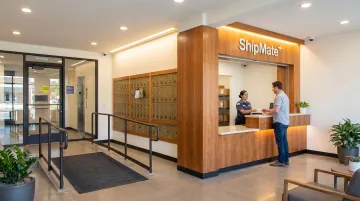
ShipMate+ at 1929 W Vista Way Suite F provides all of these features for Vista residents and businesses.
Business Legitimacy and Package Handling
A street address from a physical mailbox rental can be used on:
- Business filings and LLC registrations
- Bank account applications
- Marketing materials and business cards
- Professional correspondence
Unlike a P.O. Box, which many banks and state agencies reject as a primary business address, a street address with a suite or PMB number provides greater institutional acceptance — though it's identifiable as a commercial mail receiving agency address.
Physical mailbox stores accept packages of all sizes from all carriers, receive and sign on the renter's behalf, and securely store items until pickup. Especially useful for:
- E-commerce sellers managing returns
- Home-based businesses expecting regular shipments
- Anyone ordering bulky items who can't receive home deliveries during business hours
Who Benefits Most from a Physical Mailbox Rental?
A physical mailbox rental makes the most sense when you need a real street address, reliable package handling, or a credible business presence in Vista.
It's a strong fit for:
- Home-based business owners who need a professional street address separate from home
- Small business owners who receive shipments or returns regularly
- Privacy-conscious individuals who prefer in-person pickup and direct package handling
- Businesses needing a local address for banking, licensing, and customer-facing materials
If consistent physical access and package security are priorities, a local mailbox rental covers those needs directly.
Virtual Mailbox vs Physical Mailbox: Which Is Right for You in Vista?
Decision Factors
Before choosing, ask yourself:
- How often do you receive physical packages?
- Do you need a business-registerable street address?
- Are you primarily local or frequently traveling?
- How important is remote access vs. in-person pickup?
- What's your monthly mail volume and package size range?
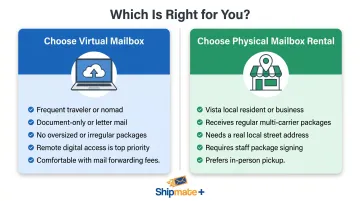
Choose a Virtual Mailbox If:
You should opt for a virtual mailbox when:
- You travel frequently or live outside Vista for extended periods
- Your mail consists mostly of documents (invoices, notices, statements)
- You don't need to receive oversized packages
- Remote digital access is your top priority
- You're comfortable paying forwarding fees for physical items
Choose a Physical Mailbox Rental If:
A physical mailbox rental is the better choice when:
- You're a Vista resident or operate a local business
- You regularly receive packages from multiple carriers
- You need a credible local street address for business or banking purposes
- You want staff to sign for deliveries on your behalf
- You value the security of in-person pickup
Local Vista Context
Vista's economic profile makes physical mailbox rentals particularly valuable. The city has identified distribution and e-commerce as a key industry cluster, and 85% of small businesses along the 78 Corridor anticipate growth.
For home-based businesses in Vista — part of a region with nearly 300,000 nonemployer establishments — a physical mailbox rental provides the address credibility and full-service package handling that virtual-only services can't replicate.
ShipMate+ bridges both worlds: email and text alerts notify you the moment mail arrives, while 24/7 lobby access and on-site staff signing mean your packages are always handled — whether you're in Vista or across the country.
Frequently Asked Questions
Is a virtual mailbox a good alternative to a physical mailbox?
A virtual mailbox works well for travelers and remote workers managing mostly document-based mail. However, it falls short for those who regularly receive packages, need a locally credible street address, or want in-person pickup. In those cases, a physical mailbox rental is the stronger option.
Does the IRS accept a virtual mailbox as a mailing address?
The IRS generally accepts any mailing address where you reliably receive correspondence, including virtual mailbox street addresses. Form SS-4 prohibits P.O. Boxes for physical address lines only, but tax professionals recommend confirming with a CPA since some state filings carry separate requirements.
Can you use a virtual mailbox as a physical address?
Virtual mailboxes come with a real street address, not a P.O. Box, so they can sometimes be used on business filings. However, acceptance varies by state and institution. Some states or banks may require a verifiable commercial location, which a physical mailbox rental at a local Vista store more reliably satisfies.
What is the cost difference between a virtual mailbox and a physical mailbox rental?
Virtual mailboxes typically start around $5–$50/month depending on scan volume and features. Local physical mailbox rentals vary by box size, ranging from $10–$20 for small boxes to $30–$50 for large boxes. Contact ShipMate+ at (760) 295-1074 for current Vista pricing.
Can I receive packages at a virtual mailbox?
Many virtual mailbox providers accept packages but often have size and carrier restrictions, plus forwarding fees. A physical mailbox rental at a full-service store like ShipMate+ accepts packages from FedEx, UPS, and USPS regardless of size — staff receive and sign for them, with no forwarding fees for in-person pickup.
What is the best mailbox option for a home-based business in Vista, CA?
A physical mailbox rental is the stronger choice for Vista home-based businesses because it provides a real local street address for business registration, separates home and business mail, and handles the full range of deliveries. Virtual options may suit businesses that operate entirely remotely with minimal physical mail needs.