Introduction
Picture this: You've ordered something important online, and the seller confirms it's shipped. Days pass. You check the tracking page every few hours, but the status hasn't budged since "Label Created." You have no idea where your package actually is or when it will arrive. This frustration—the black hole of package tracking—is exactly what modern shipment tracking systems are designed to solve.
This guide covers everything you need to know about tracking packages across the three major U.S. carriers: USPS, UPS, and FedEx. You'll learn how tracking works from label creation to doorstep delivery, how to read statuses like "In Transit" and "Delivery Exception," and what to do when tracking goes silent.
Whether you're waiting on a domestic order or an international shipment from overseas, you'll finish this guide knowing exactly what to look for — and what to do when things go wrong.
TLDR: What You Need to Know About Shipment Tracking
- Tracking numbers appear when a shipping label is created—not when the carrier physically picks up your package
- Each carrier has its own tracking portal, but multi-carrier tracking sites like 17track.net can check packages across multiple carriers at once
- Common statuses like "In Transit" and "Out for Delivery" represent specific scan events at carrier facilities, not real-time GPS locations
- Tracking gaps are normal—missed scans, weekend delays, and customs holds cause temporary freezes in updates
- Free programs like USPS Informed Delivery and UPS My Choice send proactive alerts and delivery management options straight to your inbox
How Shipment Tracking Works—From Label to Doorstep
What Is a Tracking Number?
A tracking number is a unique identifier assigned to your shipment the moment a shipping label is printed. This number links to all scan data collected throughout the package's journey—from the shipper's facility to sorting hubs, delivery vehicles, and finally your doorstep.
USPS tracking numbers typically start with specific prefixes that indicate the service level: 9400 for USPS Tracking, 9205 for Priority Mail, 9407 for Certified Mail, and 9270 for Priority Mail Express. UPS tracking numbers often begin with "1Z," while FedEx uses 12-digit numeric codes.
The Lifecycle of a Tracked Package
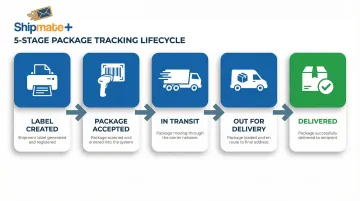
Every tracked package follows a similar journey:
- Label Created — The shipper prints a shipping label using carrier software, generating a tracking number and transmitting shipment details electronically to the carrier
- Package Accepted — The carrier performs its first physical scan when a driver picks up the package, it's dropped off at a retail location, or it arrives at an origin facility
- In Transit — The package moves through sorting hubs and distribution centers, with barcodes scanned by automated equipment at each facility
- Out for Delivery — The package is loaded onto a local delivery vehicle and scanned by the driver
- Delivered — Final scan confirms the package was dropped off at the destination address
The Critical Distinction: Label Created vs. Package Accepted
This is where confusion starts. "Label Created" or "Pre-Shipment" statuses appear as soon as a shipper prints a label—but the carrier doesn't have the physical package yet. UPS explicitly states: "We've received the shipment details and billing information from the sender of the shipment. Once we have possession of the shipment and have it moving within our network, the status will be updated."
Until the carrier performs an "Acceptance" scan—the first physical scan of the package's barcode—no movement will show in tracking. This acceptance scan happens when a driver picks up the package, when you drop it off at a retail counter, or when it's first processed at a sorting facility.
How Barcodes and Scanning Create Tracking Events
Every scan along a package's route generates a specific event code that feeds into the carrier's central tracking system. Here's how that data gets created:
- High-speed automated scanners read barcodes as packages travel conveyor belts through distribution centers, creating "Arrived at Facility" and "Departed Facility" events
- Carrier employees use handheld scanners when loading trucks or completing final delivery
- For USPS, scan data flows into the Product Tracking and Reporting (PTR) and Informed Visibility platforms
These systems compile every scan event into the tracking history you see online.
Why Scan Gaps Happen
Not every package gets scanned at every step. A 2023 USPS audit found an acceptance scan rate of 94.2%, meaning roughly 1 in 17 packages entered the network without a proper initial scan. Some carriers provide near real-time GPS updates, while others rely purely on scan points—creating stretches where tracking goes silent.
Common reasons for scan gaps include:
- Trailer-level loading — individual packages aren't re-scanned until a container is unloaded, which can take 24–72 hours
- Weekend and overnight transit — packages moving outside business hours may not be processed until the next workday
- Holiday backlogs — high volume causes packages to miss sorting cycles entirely
- Customs holds — international shipments can sit in customs for days or weeks with no status updates
How to Track a Package with USPS, UPS, and FedEx
USPS Tracking
To track a USPS package, visit usps.com and enter your tracking number in the tracking tool. Your tracking number appears on your receipt or in the shipping confirmation email from the sender.
USPS tracking numbers follow specific formats based on service level:
- USPS Tracking: 9400 1000 0000 0000 0000 00
- Priority Mail: 9205 5000 0000 0000 0000 00
- Certified Mail: 9407 3000 0000 0000 0000 00
- Priority Mail Express: 9270 1000 0000 0000 0000 00
You can also track via text by sending your tracking number to 28777 (2USPS). USPS will reply with the latest tracking status.
For proactive notifications, sign up for USPS Informed Delivery, a free service that provides daily email previews of incoming mail and a consolidated dashboard to track all packages scheduled for delivery to your address. As of March 2025, over 72.9 million users rely on Informed Delivery for package tracking notifications.
UPS Tracking
Track UPS packages at ups.com/track by entering your tracking number. UPS tracking numbers typically start with "1Z" followed by alphanumeric characters.
UPS My Choice is a free service that improves tracking visibility for regular receivers. Basic membership includes:
- Delivery alerts and estimated delivery windows
- Proof-of-delivery photos
- Ability to reroute packages or leave driver instructions
- "Follow My Delivery" map view showing the vehicle's approximate location (an estimate, not a guaranteed real-time GPS feed)
FedEx Tracking
Use fedex.com/tracking to track FedEx packages. Enter your tracking number (typically a 12-digit numeric code) to see real-time status updates.
FedEx Delivery Manager is a free service with customized alerts via email, text, or phone. Key features include:
- Picture proof of delivery
- Dynamic map view showing package movement for eligible shipments
- Specific delivery instructions for the driver
- Package redirect to Walgreens or FedEx Office locations
- Vacation hold for up to 14 days
International Packages (Including from China)
Packages shipped from China or other countries typically use carriers like China Post, ePacket, or SF Express for the international leg, then hand off to USPS for domestic delivery. Tracking unfolds in two phases:
- International transit — The origin carrier (e.g., China Post) generates initial tracking events as the package moves through China and international transit
- Domestic handoff — Once the package arrives in the U.S., clears customs, and receives an "Acceptance" scan at a USPS facility, domestic tracking events appear on usps.com
To track international packages, use 17track.net, a universal tracking aggregator that pulls data from over 3,200 carriers worldwide. 17TRACK merges tracking events from both the origin carrier and USPS into a single chronological timeline, providing complete end-to-end visibility.
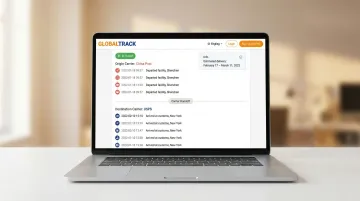
Delays at customs are normal and cause tracking to appear frozen for days or weeks. This is not a sign your package is lost—it's simply waiting for customs inspection and clearance.
Track Packages from One Location in Vista, CA
Once you know how to track a package, the easiest way to get a tracking number in the first place is to ship everything from one location. ShipMate+ in Vista, CA makes that simple. As a FedEx Authorized Ship Center, UPS Authorized Shipping Outlet, and USPS Approved Shipper, ShipMate+ allows you to drop off packages at one location and receive a tracking number on the spot for any of the three carriers—no waiting in post office lines.
ShipMate+ is located at 1929 W Vista Way Suite F, Vista, CA 92083, and is open Monday–Friday 9:00 AM–6:00 PM and Saturday 9:00 AM–1:00 PM. Contact them at (760) 295-1074 for shipping assistance.
How to Read Tracking Statuses and Delivery Updates
Common Tracking Statuses Explained
Here's what each tracking status actually means, so you know exactly where your package stands:
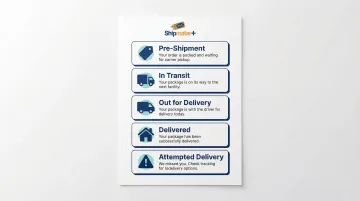
| Status | What It Means |
|---|---|
| Label Created / Pre-Shipment | Label printed and details sent to the carrier, but the package hasn't been picked up yet. Contact the shipper, not the carrier, for updates. |
| In Transit | Package is moving through the carrier's network toward its destination. A scheduled delivery date is typically visible. |
| Out for Delivery | Package is on a local delivery vehicle and will arrive today, usually between 9 a.m. and 7 p.m. |
| Delivered | Package was delivered to the destination address with a recorded timestamp. If no signature was required, the driver left it in a safe spot. |
| Attempted Delivery / Notice Left | Driver couldn't complete delivery. USPS uses statuses like "Notice Left (No Authorized Recipient Available)." The driver typically leaves a door notice with redelivery or pickup instructions. |
What Is a Delivery Exception?
A Delivery Exception status means an unexpected event temporarily interrupted normal delivery progress. Your package is not lost — it's flagged until the issue is resolved.
Common triggers for delivery exceptions include:
- Weather delays — Extreme weather or natural disasters halt carrier operations
- Address issues — Insufficient address, incorrect address, or address cannot be matched
- Recipient unavailable — Business closed, no one available to sign, or no access to delivery location
- Customs hold — International shipments face documentation or clearance delays
- Damaged package — The package sustained damage requiring inspection or repackaging
What to do: Check for a door notice with specific instructions, contact the carrier's customer service with your tracking number, or update delivery instructions through the carrier's app or website.
What Does "Delivery Update" Mean?
A delivery update is any new scan event that refreshes the tracking record. Each time the package is scanned at a new location or changes hands, the tracking page updates and triggers notification alerts if you've opted into carrier notifications.
Keep in mind: a new update confirms the package was scanned at a specific point in the network, but doesn't necessarily mean it's physically closer to you yet.
Are Estimated Delivery Dates Guaranteed?
No. All three major carriers explicitly state that estimated delivery dates are projections, not guarantees. USPS clarifies that its Expected Delivery Window (ExD™) is a 2-hour projection, but "delivery within that time is not guaranteed." UPS suspended its Service Guarantee for most standard services, making scheduled delivery dates estimates. FedEx refers to delivery times as "estimated delivery time windows."
Estimated dates are calculated based on the service selected, current carrier volume, and historical delivery performance. Unexpected delays can push them back.
What to Do When Your Package Tracking Isn't Updating
Why Tracking Goes Stale
Tracking updates can stop for several legitimate reasons that don't mean your package is lost:
- Missed scans between facilities — USPS in-transit scan compliance averages 91.5%, meaning nearly 9% of packages miss intermediate scans
- Weekend and holiday gaps — Packages traveling over weekends may not be processed until Monday
- High-volume periods — Holiday backlogs cause processing delays
- International customs holds — Customs inspection can freeze tracking for days or weeks
- Trailer-level movement — Packages are scanned when loaded into containers but not again until unloaded 24-72 hours later
The package is almost always still in motion—the tracking page just hasn't caught up.
Step-by-Step Action Plan
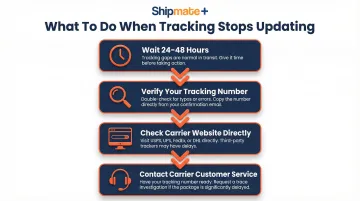
If your tracking hasn't updated, follow this process:
- Wait 24-48 hours after the last update before escalating—scan gaps are normal during long-haul transit
- Verify the tracking number is entered correctly with no typos or missing digits
- Check the carrier's website directly rather than third-party trackers, which may not refresh as frequently
- Contact carrier customer service with the tracking number if no update appears after the expected delivery date has passed
When to File a Missing Package Claim
File a claim in these specific situations:
- The package shows "Delivered" but you didn't receive it (check with neighbors and household members first)
- Tracking hasn't updated in an unusually long period past the guaranteed delivery date
- The carrier confirms the package is lost after investigation
Claim filing windows differ by carrier:
| Carrier | Claim Type | Filing Window |
|---|---|---|
| USPS | Missing Mail search | Start at 7 days after mailing |
| USPS | Lost — Priority Mail / Ground Advantage | 15–60 days after mailing |
| USPS | Lost — Priority Mail Express | 7–60 days after mailing |
| USPS | Damaged | Immediately, up to 60 days |
| UPS | Lost or damaged | Within 60 days of scheduled delivery |
| FedEx | Damaged or missing contents | Within 60 days of shipment date |
| FedEx | Non-delivery (standard) | Within 9 months of shipment date |
| FedEx | Non-delivery (Ground Economy) | Within 90 days of shipment date |
Always verify current claim windows on the carrier's official website before filing.
Tips to Never Miss a Delivery
Sign Up for Carrier Notification Services
The most effective way to stay ahead of delivery updates is to enroll in carrier notification services that send proactive alerts:
- USPS Informed Delivery sends daily email previews of incoming mail plus automatic tracking updates through a consolidated dashboard — free to enroll
- UPS My Choice (free basic tier) provides delivery alerts, estimated windows, proof-of-delivery photos, and options to reroute packages or leave driver instructions
- FedEx Delivery Manager lets you set custom alerts via email, text, or phone, view picture proof of delivery, and redirect packages to a nearby retail location — all at no cost
These services work well when you can adjust your schedule around a delivery. When you can't, a dedicated receiving service fills the gap.
Use a Package Receiving Service or Private Mailbox
If you're frequently away or unable to receive deliveries at home, a package receiving service solves the problem directly. ShipMate+ in Vista, CA offers mailbox rental with a real street address — not a P.O. Box — that includes:
- Accepts packages with signature from all major carriers — USPS, UPS, FedEx, DHL, and couriers
- Sends email and text alerts the moment mail or packages arrive
- Provides 24-hour access to a secure, well-lit mailbox lobby for after-hours pickup
- Doubles as a professional business address for home-based businesses and remote workers
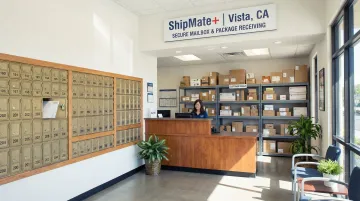
ShipMate+ staff sign for critical deliveries on your behalf and store packages securely until you pick them up — no more missed deliveries or stolen porch packages. Reach them at (760) 295-1074 or stop by at 1929 W Vista Way Suite F, Vista, CA 92083 (Mon–Fri 9 AM–6 PM, Sat 9 AM–1 PM).
Practical Delivery Habits
Additional strategies to ensure successful deliveries:
- Leave delivery instructions in your carrier app — specify the porch, side door, or a neighbor's unit
- Authorize a release signature in advance so drivers can leave packages without needing someone home
- Designate a trusted neighbor to accept packages during extended trips
Frequently Asked Questions
How do I track a shipment using a tracking number?
Locate your tracking number from your shipping receipt or confirmation email, then enter it directly on the carrier's website (usps.com, ups.com, or fedex.com) to see real-time status updates. You can also use universal tracking aggregators like 17track.net to track packages from multiple carriers in one place.
Can you track exactly where a package is?
Real-time GPS tracking is only available through select premium services like UPS My Choice and FedEx Delivery Manager, and even those show approximate vehicle location estimates rather than precise GPS feeds. Standard tracking shows the last scan location at a carrier facility, not the package's exact current position.
How do I track a package with USPS?
Visit usps.com and enter your tracking number in the tracking tool. You can also sign up for USPS Informed Delivery to receive proactive email alerts with tracking updates, or text your tracking number to 28777 (2USPS) for instant status updates via SMS.
How do I track a package shipped from China?
Enter your tracking number on 17track.net to follow the full journey — from the origin carrier in China through USPS once the package clears customs. Gaps during international transit and customs inspection are normal and don't indicate a lost package.
What does delivery update mean?
A delivery update is any new event recorded when the package is scanned at a carrier facility or during a delivery attempt. It refreshes the tracking page and triggers notification alerts if you've opted in to carrier notification services.
How do I track my freight shipment?
Freight shipments are tracked using a PRO number (the freight equivalent of a tracking number), entered on the freight carrier's website. Note that freight tracking updates less frequently than parcel tracking and typically shows terminal-to-terminal scan events rather than detailed in-transit scans. For freight shipping assistance, contact ShipMate+ at (760) 295-1074—they work with over 40 freight carriers for LTL, air cargo, and sea container shipments.