Introduction
California businesses and residents ship hundreds of millions of packages every year, from online sellers fulfilling orders to families sending gifts and companies managing returns. With so many FedEx service options, finding the right location and choosing the right shipping tier can be genuinely confusing. Long lines at major FedEx Office stores only add to the frustration.
What many Californians don't realize is that FedEx Authorized Ship Centers offer a faster, more convenient alternative to large retail locations. These independently owned businesses—like ShipMate+ in Vista, CA—provide the same FedEx services with shorter wait times, personalized help, and multi-carrier options under one roof.
This guide walks through FedEx service tiers, location types across California, pricing factors, and how Authorized Ship Centers compare to standard FedEx Office stores.
Key Takeaways
- FedEx ships via Express (overnight–3 days), Ground (1–5 days), Home Delivery (residential/weekend), and Freight (150+ lbs)
- Print labels at home, at FedEx Office, or at an Authorized Ship Center—QR codes work if you don't have a printer
- California has 2,145 FedEx locations; ShipMate+ in Vista is an Authorized Ship Center with no lines and faster service
- Drop off prepaid packages at any authorized location—no account needed, just bring your shipment
What Are FedEx Print & Ship Services?
FedEx Print & Ship combines two essential service categories: shipping services—physically transporting packages through FedEx's carrier network—and printing services—creating shipping labels, packing slips, and business documents needed to send packages.
These services cover a wide range of needs, from individuals shipping personal items or returning online purchases to e-commerce sellers managing daily fulfillment and small businesses handling B2B deliveries.
Where to access these services in California:
FedEx services are available at three main location types:
- FedEx Office locations – Corporate-owned stores offering full-service printing, packing, and shipping
- FedEx Drop Boxes – Unmanned drop-off points for prepaid packages
- FedEx Authorized Ship Centers – Independently owned businesses certified to process FedEx shipments, often with faster turnaround and more hands-on service
Knowing the difference helps you pick the right option. FedEx Office locations work well for high-volume or complex print jobs, while Authorized Ship Centers like ShipMate+ in Vista offer the same FedEx reliability with a more personal, efficient experience.
FedEx Shipping Options Available in California
Express Services: When Speed Matters
FedEx Express moves approximately 17 million packages per day globally, offering time-definite delivery windows for urgent shipments.
Choose Express when:
- You need guaranteed next-business-day delivery by a specific time
- Documents or packages are time-sensitive (contracts, medical supplies, event materials)
- Missing a deadline would cost more than premium shipping
Key Express tiers:
- FedEx Priority Overnight – Next business day by 10:30 a.m. to most addresses
- FedEx Standard Overnight – Next business day by 3 p.m. (businesses) or 5 p.m. (residences)
- FedEx 2Day – Second business day by 5 p.m. (businesses) or 8 p.m. (residences)
- FedEx Express Saver – Third business day by 5 p.m., the most economical Express option
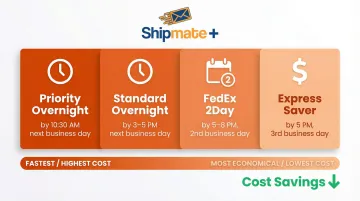
As of January 13, 2026, FedEx reinstated its Money-Back Guarantee for time-definite U.S. domestic services, providing refunds if delivery occurs 60 seconds or more after the commitment time.
Ground and Home Delivery: Cost-Effective Options
- FedEx Ground – Serves commercial addresses Monday–Friday with 1–5 business day delivery. Best for heavier, less urgent shipments where cost matters more than speed.
- FedEx Home Delivery – Delivers to residential addresses every day of the week, including Saturdays and Sundays. A residential surcharge applies, but weekend delivery is included.
- California intrastate shipments – Transit times typically run 1–3 business days depending on origin and destination ZIP codes. Use FedEx's online rate tool with specific addresses for exact estimates.
International Shipping from California
California shippers moving goods to international destinations have two primary FedEx options:
- FedEx International Priority – 1-3 business days to major global hubs; Mexico City typically receives packages in 1 business day, while key Asian markets see 2-day delivery
- FedEx International Economy – 2-5 business days, offering cost savings for less urgent international shipments
These services include door-to-door, customs-cleared delivery, though remote locations may incur out-of-delivery-area surcharges.
FedEx Freight for Oversized Items
For shipments exceeding 150 lbs or 108 inches in length, FedEx Freight is required. Standard parcel services cannot accommodate these items, and attempting to ship them incurs severe unauthorized package charges—up to $1,775 per package.
Choose Freight when shipping:
- Palletized inventory
- Industrial equipment
- Office furniture
- Trade show displays
ShipMate+ in Vista coordinates freight shipments through partnerships with over 40 freight carriers, comparing rates and handling on-site palletizing so your shipment meets carrier requirements.
How to Choose the Right Service
Use this framework:
- Check weight and dimensions – Over 150 lbs? You need Freight
- Determine urgency – Need it tomorrow? Choose Express. Can wait 3-5 days? Ground saves money
- Confirm destination type – Residential addresses require Home Delivery for weekend options
- Compare rates – Staff at Authorized Ship Centers can quote all options on the spot
FedEx Printing Services: What You Can Print and How
Label Printing Options
FedEx shipping labels contain your tracking number, barcode, sender/recipient details, and service type. You can create and print them three ways:
- Online via FedEx.com — generate at home and print on your own printer, or print at a FedEx location
- Through shipping software — integrates with Shopify, WooCommerce, and Amazon for automatic order fulfillment labels
- In-person at a FedEx location — staff handle label creation and printing for you; ShipMate+ in Vista covers end-to-end label creation, printing, and package acceptance
Paperless QR Code Labels
FedEx now offers a printerless option: bring a QR code on your phone, and staff print and apply the label in-store.
How it works:
- Generate a QR code via FedEx.com, the FedEx Mobile app, or a retailer's return portal
- Bring your sealed, unlabeled package and QR code to a participating location
- Staff scan the code, print the label, and accept your package
A good fit for retail returns and anyone without printer access.
FedEx Office vs. Authorized Ship Centers for Printing
FedEx Office locations excel at large-scale business printing—banners, presentations, copies, marketing materials. If you need 500 color flyers, FedEx Office is your destination.
Authorized Ship Centers focus on shipping labels and efficient package processing. They can print labels and assist with the entire shipping workflow—from generating the label to sealing the box—without the wait times common at high-traffic FedEx Office stores.
If your visit is strictly about shipping, an Authorized Ship Center like ShipMate+ in Vista gets you in and out faster.
How to Ship a FedEx Package Step-by-Step
Step 1: Prepare Your Package
Choose a box that fits your item with 2-3 inches of cushioning space on all sides. Use bubble wrap, packing peanuts, or foam padding to protect contents.
Well-packed items prevent damage claims and avoid carrier surcharges for irregular packaging. For fragile or high-value items, consider professional packing services—ShipMate+ in Vista guarantees insurability for all items packed in-store.
Step 2: Choose Your Shipping Method and Get a Rate
Use FedEx.com's rate finder or visit a location to compare options. Be aware that both weight and dimensions affect cost.
FedEx calculates dimensional weight by multiplying length × width × height (in inches) and dividing by 139. You're charged based on dimensional weight or actual weight — whichever is greater. A lightweight but bulky box can end up costing as much as a heavier, compact one.
Step 3: Create or Receive Your Shipping Label
Path A – Generate online:
- Create your label at FedEx.com
- Print at home or save the QR code to print at a location
Path B – In-person creation:
- Visit a Ship Center where staff create the label for you
- ShipMate+ in Vista (1929 W Vista Way Suite F) offers this service with expert guidance on selecting the right service tier and packaging requirements
Step 4: Drop Off the Package
At drop-off, staff scan your barcode and provide a receipt with your tracking number. Keep this receipt—it's your proof of shipment and your tracking reference.
FedEx pickups occur daily at Authorized Ship Centers. At ShipMate+, FedEx picks up at 4:30 PM Monday-Friday and 12:00 PM on Saturday.
Step 5: Track Your Shipment
Track via FedEx.com, the FedEx app, or set up email/text notifications. Tracking updates appear at key milestones:
- Label Created – Shipper printed the label and is preparing the package
- At our facility – Package is at a FedEx-approved location
- On the way – Package is in transit or at a sorting facility
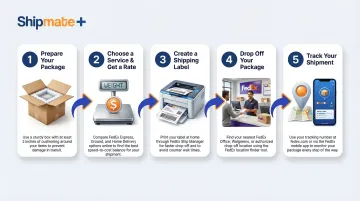
Estimated delivery times vary by service tier and destination within California.
FedEx Office vs. Authorized FedEx Ship Centers in California
What Is a FedEx Authorized Ship Center?
An Authorized Ship Center is an independently owned business certified by FedEx to accept and process shipments. These locations appear on FedEx's official location finder and carry the same service guarantees as corporate FedEx stores.
To qualify, a business must meet FedEx's operational standards:
- Designated customer service counter
- Regular Monday–Friday operating hours
- FedEx-approved automated shipping software
- Calibrated scale rated for at least 100 lbs
Key Differences
| Feature | FedEx Office | Authorized Ship Centers |
|---|---|---|
| Ownership | Corporate-owned | Independently owned (e.g., ShipMate+) |
| Wait Times | Can have significant queues at high-volume locations | Typically faster with personalized service |
| Hours | Varies by location; some 24-hour stores | Extended hours; ShipMate+ open Mon-Fri 9AM-6PM, Sat 9AM-1PM |
| Services | Full printing, packing, shipping, Hold at Location | FedEx, UPS, and USPS shipping; packing; notary; mailbox rental |
| Atmosphere | High-volume retail environment | Personalized, small-business service |
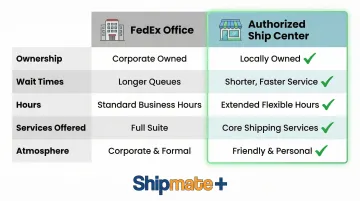
When to Choose Each
Choose FedEx Office when:
- You need large print jobs (banners, presentations, marketing materials)
- You require 24-hour access (select locations)
- You're already near a FedEx Office location
Choose an Authorized Ship Center when:
- You want to avoid lines and get faster service
- You need expert packing assistance
- You prefer personalized guidance on rate comparisons
- You want multi-carrier options (ShipMate+ ships FedEx, UPS, and USPS)
California has 2,145 FedEx locations statewide — but more locations doesn't always mean a better experience. For Vista and North San Diego County residents, ShipMate+ combines FedEx Authorized Ship Center access with UPS, USPS, notary, and mailbox services under one roof.
Tips for Saving Time and Money on FedEx Shipping in California
Cost-Saving Strategies
- FedEx One Rate covers qualifying Express shipments in FedEx packaging — envelopes (≤10 lbs) and boxes/tubes (≤50 lbs) — at a flat price that already includes residential, delivery area, and fuel surcharges, plus up to $100 in declared value. No surprise fees.
- Business accounts save up to 15% on FedEx Ground and 30% on FedEx Express compared to retail counter rates. For regular shippers, that gap adds up fast.
- Skip on-call pickups — FedEx charges $9–$14.75 per stop, plus residential surcharges. Dropping off at an Authorized Ship Center like ShipMate+ in Vista cuts those fees entirely.
- Use your own boxes for Ground shipments — FedEx Express packaging is free but restricted to Express services. For Ground, a properly sized box lowers dimensional weight charges. ShipMate+ sells packaging supplies at discounted prices and can help you size correctly.
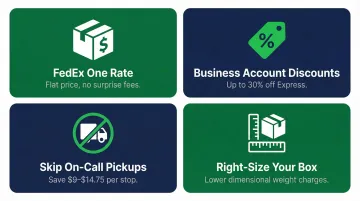
Time-Saving Tips
- Bring prepaid packages to an Authorized Ship Center — ShipMate+ accepts FedEx drop-offs at no additional charge, with no wait. Faster than FedEx Office, more reliable than an unmanned Drop Box.
- Have your label or QR code ready before you walk in — generating it online ahead of time cuts counter time to under a minute.
- Set up a FedEx account for recurring shipments — once configured, labels print in seconds without re-entering addresses or package details each time.
- Let staff compare rates on the spot — Authorized Ship Center staff can pull quotes across all FedEx service tiers immediately, so you don't have to guess or research before arriving.
Frequently Asked Questions
How do I ship a FedEx package with a prepaid label?
Bring your package with the prepaid label attached (or your QR code on your phone) to any FedEx drop-off location—including Authorized Ship Centers like ShipMate+. Staff will scan the barcode, accept the package, and provide a receipt. No payment is required.
Where can I drop off a FedEx package?
FedEx packages can be dropped off at FedEx Office locations, FedEx Drop Boxes, and Authorized Ship Centers. Search your California ZIP code on FedEx.com or the app to find nearby options. In Vista, ShipMate+ at 1929 W Vista Way Suite F accepts drop-offs Mon–Fri 9AM–6PM and Saturday 9AM–1PM.
What is a FedEx Authorized Ship Center?
It's an independently owned business certified by FedEx to accept, process, and ship FedEx packages. These centers offer the same reliability as FedEx-owned locations, often with shorter wait times and personalized service. ShipMate+ in Vista is an example of an Authorized Ship Center.
Can I print a FedEx shipping label at a local shipping store?
FedEx Authorized Ship Centers and FedEx Office locations can both print labels for you. If you've already created a label online, the QR code option works too—staff scan your code and print the label on the spot.
How much does it cost to ship with FedEx in California?
Cost depends on weight, dimensions, destination, and service speed. A 5-lb box via FedEx Ground within California typically runs $10–$15; FedEx Priority Overnight for the same package can reach $50–$75. Use FedEx.com's rate tool or stop by a local Ship Center for a quick quote.
What's the difference between FedEx Ground and FedEx Express?
FedEx Express offers overnight to 3-day delivery at a higher cost, with a guaranteed delivery time. FedEx Ground is more affordable for non-urgent shipments, with 1–5 business day delivery within California and a delivery date range rather than a specific time.
Need help shipping FedEx in Vista, CA? ShipMate+ at 1929 W Vista Way Suite F offers expert FedEx shipping services with no lines, personalized service, and multi-carrier options. Call (760) 295-1074 or visit Monday-Friday 9AM-6PM, Saturday 9AM-1PM.