This guide covers everything needed to create a FedEx shipping label in 2026: what information to gather, the three main creation methods, variables that affect cost and delivery, and the most common mistakes to avoid.
Key Takeaways
- Creating a FedEx label requires sender/recipient addresses, package weight and dimensions, service type selection, and a payment method.
- Labels can be created online at FedEx.com (with or without an account), through the FedEx mobile app, or in person at a FedEx Authorized Ship Center.
- Incorrect weight, dimensions, or address type (residential vs. commercial) are the most common causes of surprise charges.
- For occasional shippers without a printer, visiting a FedEx Authorized Ship Center is the simplest, hassle-free option.
What You Need Before Creating a FedEx Shipping Label
Gathering all required information before starting prevents errors mid-process and avoids having to void and recreate labels. The three categories of preparation are sender/recipient information, package details, and service type/payment.
Sender and Recipient Information
Required fields include:
- Full name
- Complete street address (including suite or apartment number)
- City, state, ZIP code
- Phone number
- Email address (for both sender and recipient)
Omitting suite numbers or using abbreviations that don't match USPS records can trigger FedEx's $25.50 address correction fee — so verify every field before proceeding.
Package Details
Shippers need exact package weight (in pounds and ounces) and all three dimensions (length × width × height in inches). FedEx bills based on either actual weight or dimensional (DIM) weight, whichever is greater.
FedEx DIM Weight Formula (2026):
- Divisor is 139 for U.S. domestic Ground and Express shipments
- Calculate: (Length × Width × Height) ÷ 139 = DIM weight in pounds
- Round each dimension up to the next whole inch, then round the final weight up to the next whole pound
Example Calculation: A package measuring 48.1" × 12.0" × 6.0" rounds to 49" × 12" × 6". The calculation is (49 × 12 × 6) ÷ 139 = 25.38 lbs, which rounds up to a 26 lb billable weight.
Underestimating weight or dimensions leads to post-shipment billing adjustments — sometimes several dollars per package. A postal scale and measuring tape are worth the investment.
Service Type and Payment
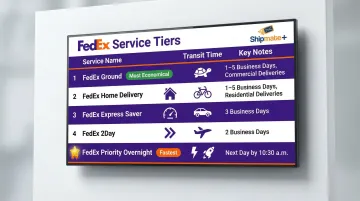
FedEx offers several service tiers, and the right choice depends on delivery deadline and budget:
| Service Tier | Transit Time | Key Notes |
|---|---|---|
| FedEx Ground | 1–5 business days (contiguous U.S.) | Primarily for commercial addresses |
| FedEx Home Delivery | 1–5 business days (contiguous U.S.) | Residential-only; delivers every day of the week |
| FedEx Express Saver | 3 business days | Delivery by 5:00 p.m. (business) or 8:00 p.m. (residence) |
| FedEx 2Day | 2 business days | Delivery by end of day |
| FedEx Priority Overnight | Next business day | Delivery by 10:30 a.m. to most businesses, noon to most residences |
A credit/debit card or FedEx account number is required to complete the label. Registered FedEx account holders receive discounted "Account-Specific Rates" rather than higher "FedEx Retail Rates."
How to Create a FedEx Shipping Label: Step-by-Step
There are three primary methods to create a FedEx label—online via FedEx.com, through the FedEx mobile app, or in person. The right method depends on shipping frequency, tech access, and whether a printer is available.
Method 1: Online via FedEx.com
Steps:
- Go to FedEx.com
- Select Shipping > Create a Shipment
- Choose "Ship as Guest" (no account needed) or log into a registered FedEx account
- Fill in Ship From and Deliver To sections
- Flag the residential delivery checkbox — missing it leads to a $6.45–$6.95 correction surcharge
- Enter package weight, dimensions, and packaging type
- Compare rates and select service type
- Enter payment details
- Review and confirm
- Download/print the label as a PDF
Registered Account Advantages:
- Saved address book
- Shipment history
- Access to negotiated rates
- Ability to reprint labels later
Guest shipping is free and convenient for one-time shipments, but a registered account unlocks better rates and tools for frequent shippers.
Method 2: Via the FedEx Mobile App
Steps:
- Download the FedEx app (available on iOS and Android)
- Log in or create an account
- Tap "Ship" > "Create a Shipment"
- Follow the same address, package, and service input steps
- Review and confirm
- Receive a QR code or printable PDF label
This method works well for shippers who want to start a shipment away from a desktop. Use the QR code to print labels at FedEx Office or any Authorized Ship Center.
Method 3: In Person at a FedEx Authorized Ship Center
This option requires no printer, no account, and no pre-filled forms. Staff handle the label creation process: shippers bring their package, provide the delivery address, and the team creates and prints the label on the spot.
This is the best option for:
- Fragile or high-value items that need professional packing
- Shippers without access to a printer or scale
- Customers who want to avoid label errors entirely
For Vista, CA residents, ShipMate+ (1929 W Vista Way Suite F) is a FedEx Authorized Ship Center that covers all three needs. The facility offers:
- In-store FedEx label creation and printing
- Professional packing services with guaranteed insurability
- Multi-carrier shipping (FedEx, UPS, USPS)
- Extended hours: Monday–Friday 9 a.m.–6 p.m., Saturday 9 a.m.–1 p.m.
- No long lines compared to traditional post offices
ShipMate+ also accepts pre-labeled FedEx packages for drop-off at no additional charge, with daily FedEx pickups at 4:30 p.m. Monday–Friday and 12 p.m. Saturday.
How to Print and Attach Your FedEx Label
FedEx supports two printing formats:
- 4×6 inch thermal label (recommended for dedicated label printers—no ink cartridges, fast output)
- 8.5×11 letter-size PDF (for regular inkjet or laser printers)
Print at 100% scale. FedEx requires labels be printed at actual size—scaling to fit will distort the barcode and prevent scanning.
Proper Label Attachment
- Place the label on the largest flat surface of the package
- Avoid seams, edges, and tape
- If printing on paper (not label stock), cover the entire label with clear packing tape to protect it from moisture
- Do NOT tape over the barcode—this can cause scan failures
If something goes wrong before drop-off, void the label in your FedEx account (if applicable) and reprint a fresh one. A damaged or altered label can delay delivery or get your package held.
Key Variables That Affect Your FedEx Label and Shipment
Most unexpected FedEx charges trace back to four decisions made at label creation — get these right and you'll avoid billing adjustments after the fact.
Service Type Selection
Selecting a slower service than the deadline requires is an obvious problem, but the reverse—paying for overnight when 2-day suffices—is a common budget drain.
Quick Comparison:
- FedEx Ground: 1–5 business days, lowest cost, ideal for non-urgent shipments
- FedEx 2Day: 2 business days, moderate cost, good for most business deadlines
- FedEx Priority Overnight: Next business day by 10:30 a.m., highest cost, for urgent shipments
Choose the slowest service that still meets your delivery deadline to minimize costs.
Dimensional (DIM) Weight vs. Actual Weight
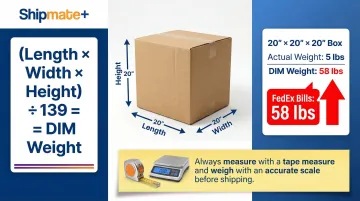
FedEx charges based on whichever is greater—actual weight or DIM weight (calculated from package dimensions). Undersized estimates on either metric are a leading cause of post-shipment surcharges.
How DIM Weight is Calculated:
(Length × Width × Height) ÷ 139 = DIM weight in pounds
Example: A lightweight but bulky package measuring 20" × 20" × 20" weighs 5 lbs on a scale. DIM weight = (20 × 20 × 20) ÷ 139 = 57.55 lbs, rounded up to 58 lbs billable weight. FedEx will charge for 58 lbs, not 5 lbs.
Always measure and weigh packages accurately to avoid billing adjustments.
Residential vs. Commercial Address
FedEx applies a residential delivery surcharge for packages going to home addresses:
- $6.95 per package for FedEx Express
- $6.45 per package for FedEx Ground and Home Delivery
If the residential checkbox is not selected and the package ends up at a residence, FedEx can charge the original shipping fee plus a $25.50 address correction fee. Always verify the address type before finalizing the label.
Beyond the address type, declared value is the other cost-side variable most shippers overlook until something goes wrong.
Declared Value
FedEx's standard liability limit is $100. If shipping something worth more, you'll need to add declared value coverage for an additional charge:
- $4.95 for shipments valued between $100.01–$300
- $1.65 per $100 of declared value for shipments valued in excess of $300
This isn't insurance — it raises FedEx's liability cap if the package is lost or damaged.
Common Mistakes When Creating a FedEx Shipping Label
Skipping the Address Verification Step
Not using FedEx's "Perform Address Check" tool is one of the most costly errors. Typos or incomplete addresses—missing apartment/suite numbers, wrong ZIP codes—lead to delivery failures, return-to-sender fees, or $25.50 address correction surcharges. Always run the address check before finalizing.
Entering Inaccurate Package Weight or Dimensions
Underestimating weight or providing rounded/guessed dimensions is a common mistake. FedEx re-weighs and re-measures packages at processing facilities, and any discrepancy results in a billing adjustment charged after the fact. A postal scale and measuring tape will pay for themselves quickly.
Not Checking the Residential Delivery Box
Many shippers assume "address" means any delivery location, but FedEx distinguishes between residential and commercial stops. Not checking this box when shipping to a home address leads to unexpected correction fees.
Printing the Label at the Wrong Size or Scale
Printing a 4×6 label on letter paper at "fit to page" scale distorts the barcode and can make it unscannable. Always print at 100% / actual size, and confirm the printer settings before hitting print.
Using an Expired Label
FedEx labels have a ship-by date — a label created today can't be used weeks later. Emailed labels are printable for up to two years, but once printed, you typically have two weeks to use it before it expires.
If a shipment is delayed, void the old label and generate a new one with the correct ship date.
When to Skip DIY and Use a FedEx Authorized Ship Center
Creating a label yourself makes sense when you ship regularly and have the tools (printer, scale, measuring tape) and confidence in the process. However, there are clear situations where going in-store is the better choice:
- No printer available
- Packaging is fragile or oddly shaped
- The item is high-value and needs careful packing
- You want to hand it off without worrying about label errors
At an Authorized Ship Center, staff create the label, handle packaging if needed, and accept your package in one visit — no separate trip to a FedEx drop box required.
ShipMate+ at 1929 W Vista Way Suite F in Vista, CA is a FedEx Authorized Ship Center offering:
- Multi-carrier shipping (FedEx, UPS, USPS)
- Professional packing services with over 20 box sizes, bubble wrap, packing peanuts, and heavy-duty tape
- Guaranteed insurability on all items packed in-store
- Extended hours Monday–Saturday (9 a.m.–6 p.m. weekdays, 9 a.m.–1 p.m. Saturday)
- No long post office lines
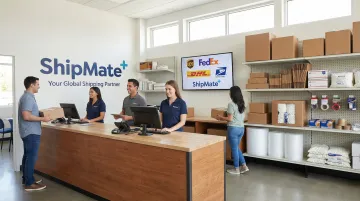
Authorized Ship Centers also accept prepaid or pre-labeled packages for drop-off — useful even when you've already created a label at home.
Frequently Asked Questions
Frequently Asked Questions
How much does it cost to create a FedEx shipping label?
Creating the label is free online or via the app; you pay only the shipping rate, which varies by package weight, dimensions, service type, origin, and destination. Registered FedEx account holders typically qualify for discounted rates.
How do I get a FedEx shipping label?
You can create it yourself at FedEx.com or via the FedEx app, or have it created in person at a FedEx Office or an FedEx Authorized Ship Center — ShipMate+ in Vista, CA handles label creation on-site alongside packing and drop-off.
Can I print my own labels at FedEx?
Yes, FedEx Office locations and Authorized Ship Centers can print labels for you—either from an email, a QR code on your phone, or by creating the shipment on-site. A small fee may apply at retail locations.
How to put a FedEx shipping label on a package?
Place the label flat on the largest surface of the package, avoid seams and edges, and cover it with clear packing tape (avoiding the barcode) if it's printed on plain paper rather than label stock.
Can I create a FedEx shipping label without an account?
Yes, FedEx.com allows guest shipment creation—no account required. However, a registered account enables label reprinting, shipment history, saved addresses, and better rates.
How do I void or cancel a FedEx shipping label?
Log into your FedEx account, go to shipment history, and select void before the package is scanned into the network. Unused labels expire automatically — no refund request needed since FedEx only charges at scan.